
 Not all photo apps save EXIF data on an iPhone. In fact, a lot of them don’t. We have a list of many of those that do on our Photo App Resolution page. The iPhone camera didn’t always support this feature but since its introduction on iOS, it’s become a popular feature among iPhoneographers.
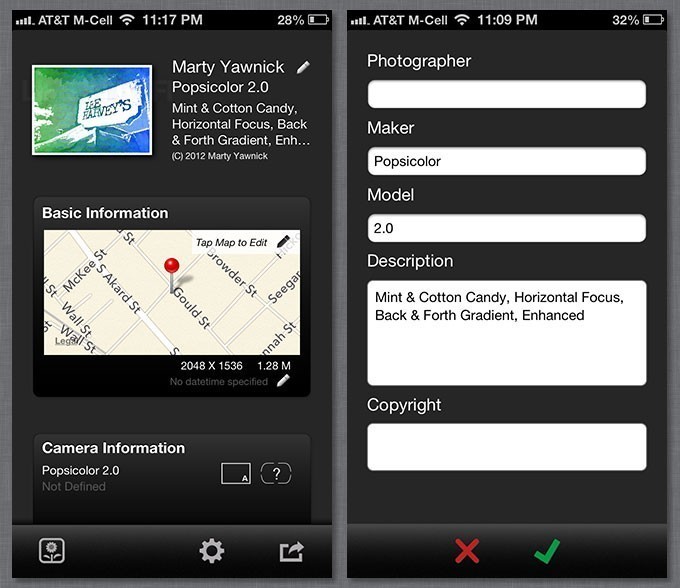
EXIF-fi (Photo GPS/EXIF viewer and editor) is a new, free photo app that quickly and easily allows you to edit or add some of the EXIF data that’s either in or missing from your images. Keep reading for more on EXIF data on iOS and this app. >>>
You may hear a lot of talk about EXIF data in iPhone photos. EXIF data refers to the data that the camera (or app) saves in an image. On an iPhone, it often includes camera info, shutter speed, device ISO number used for capture, the F stop and other data including a Geotag of where the image was taken. In many cases, the app will also add extra information about the filters used. Both Hipstamatic and Popsicolor use these tags.
EXIF-fi is a new free iPhone utility that lets you view, edit or add EXIF data that may be incorrect or missing. It’s a lean, easy interface that allows you to add or edit date, photographer and copyright information to your photos. Most photo apps don’t save this info in the image and this adds another layer of copyright protection to your photographs. This is different than adding a visible watermark to your image as this info is stored as part of your photo’s metadata. You can also add or edit app information, including app used and filters in case you want to keep that recipe a secret.
EXIF-fi can also add or change missing or incorrect location data in an image. To add or change location data, simply tap on the map and drop a pin onto the correct location. There is no need to enter clunky geo-coordinates. You can do this to either add or move a Geotag.
The app won’t let you edit all EXIF data. Camera data is not editable. If it’s not already in the image, there’s no way to add it with this app. Also, the copyright field is obscured when the keyboard slides up (which prompted me to write a how-to on the copyright symbol earlier this week).
The free version is fully functional and lets you edit one image at a time. There’s a $0.99 in-app purchase that lets you batch edit images easily. The in-app purchase will also disable any iAds. The first release of the app is ad-free, but I’m certain this will be fixed in an update. EXIF-fi saves images at their original resolution.
There are other iOS utilities that let you edit EXIF data and Geotags in your photos, but EXIF-fi is easy to use and fully functional as a free app.
EXIF-fi (Photo GPS/EXIF viewer and editor) is a free download with a $0.99 in-app purchase. It is not a Universal app, but will work on an iPad in compatibility mode. Requirements: Compatible with iPhone 3GS, iPhone 4, iPhone 4S, iPhone 5, iPod touch (3rd generation), iPod touch (4th generation), iPod touch (5th generation) and iPad. Requires iOS 4.3 or later. This app is optimized for iPhone 5.
=M=
~~~~

