Posts Tagged ‘DRC’

Photo App Review: Orasis — More Fake-HDR Than DRC

Orasis
Version 1.0

Rating 2 stars

Bottom Line: I didn’t like it. Images look more like single-photo fake-HDR apps than images corrected to be more visually accurate.

Even with the superior phone camera of the iPhone 4 (and hopefully and even better camera coming in the new iPhones later this year), a Dynamic Range Correction app is an essential component of my toolbox. For years, that app has been Perfectly Clear by Athentech.

New photo app Orasis by Orasis Imaging claims to “[capture] reality, not just light.” It attempts to make photos more realistic by simulating the sensation of appearance formed by our Visual System. While the sample image in the App Store looks good, the real world images that I tested it with didn’t look like reality, but more like the results from a single-image HDR app.

Read the rest of this entry →

iPhone App Review: Perfectly Clear 2.2 – Some Features Fixed, Others Broken

Perfectly Clear for iPhone sample DRC Dynamic Range Correction

.

Athentech Perfectly Clear for iPhoneUPDATED: Glyn Evans from The iPhoneography Blog provided an additional fix to the app’s “Out of Memory” errors. It’s now included here and I’ve changed my recommendation. =M=

Perfectly Clear by Athentech has been one of my mainstay apps for several updates and two iPhones. On my older iPhone, it was my first step with nearly every image I processed. It’s fast, easy Dynamic Range Correction (DRC) that balances luminance and color, adds sharpness, and in more recent versions helps to reduce noise especially in processing images with a lot of darker areas. Perfectly Clear helps to overcome the deficiencies and limitations of the iPhone’s camera.

Perfectly Clear was recently updated. The 2.2 update fixes some lingering stability and reliability issues with the app, adds some high resolution graphics for retina displays, and limits the processed size of images. The new update still has memory issues. Read on for more info on what to expect from this new update.

Read the rest of this entry →

iPhone Photo App Review: Primasnap

Primasnap iPhone HDR DRC

Primasnap: before & after. Click to enlarge

.

Primasnap
Version 1.0
Price: $0.99
Primasnap - Viderea, Inc.

Rating 3 1/2 stars

Bottom Line: It’s not HDR, but it’s fast, simple, and good for iPhone photographers who just want to quickly tweak their images. It’s not the miracle fix-all app the description implies.

primasnap

I’m usually wary of any iPhone photo app that promises true HDR from existing images in your photo library or tries without taking multiple exposures. Real HDR involves at least three exposures and can create stunning color and detail throughout the entire visible spectrum. Even Apple’s Camera supports real HDR. Often, though, most apps just latch onto the phrase HDR because it’s a buzz word.

Primasnap by Viderea is a new Dynamic Range Correction (DRC) photo app that claims to produce HDR-like results by using one exposure. Hey, they got your attention, didn’t they? It’s really an exposure enhancement app — one of the good ones, but not HDR.

Read the rest of this entry →

Review: Photomizer for iPhone and iPod Touch [UPDATED]

Photomizer
Version 1.0
Price: $3.99 (on sale for $0.99)

Rating 2.5 stars

Bottom Line: Decent image correction quality. Has trouble with larger sized images.

[UPDATE]: I am updating my review of the app. I owe the developers an apology for the unnecessarily harsh review I wrote previously. I had erroneously reported that the app only saves at 320×240 pixels. I had looked for a setting to allow large file saves. In the settings screen there isn’t one — or so I thought. The setting which determines file size is deceptively hidden as the “Allow Image Editing” setting. This is turned off by default. I had turned it on when I tested this app for my review. Leaving it off allows for full size image processing. I highly recommend that they change the misleading “Allow Image Editing” setting to something more descriptive, like a toggle between small and original image saves.

Photomizer by Engelmann Media GmbH is on sale this week for $0.99. It’s a Dynamic Range Correction app that is supposed to help  compensate for weaknesses in the iPhone’s camera. It does an acceptable job of correcting images, but not an outstanding one — no better than many of the other apps which process an image on the iPhone itself.

Read the rest of this entry →

Photomizer: New DRC App. Here’s the Description Translated

Photomizer is a new Dynamic Range Correction app from Engelmann Media GmbH. It’s the iPhone/iPod Touch version of their DRC software for Windows, so they definitely have knowledge and experience in this area for creating an app that should do a good job of photo enhancement on an iPhone.

Photomizer is in the same class of apps as Perfectly Clear, imphoto, and TruSight Pro.

However, the description that accompanies this newly released app in the US Store is in German with no English translation. I don’t speak German myself, but Google does. Below is the Google translation of Photomizer’s App Store description.

I won’t be reviewing the app here. Although it’s attractively priced at $0.99 USD, it also does its magic off the iPhone and on the Photomizer’s servers. An internet connection is required to use the app. Although the fast 3G network speeds may minimize the delays in transfer time, I prefer all of my processing to be done on my iPhone. This app would not be usable in Airplane mode and I do a lot of my post-travel image processing while in flight. Your workflow may vary and the connectivity requirement may not be an issue for you.

Until an English version of the description is posted, read on for the translated version:

—-

Read the rest of this entry →

Review: Trusight Pro 1.2 – Great Exposure Fix and Now Full-Res

Trusight Pro
Version 1.2
Price: $2.99
Trusight

Rating 4 stars

Bottom Line: Now an excellent full-res app for all first-line exposure enhancements.

Trusight Pro

Trusight Pro

When shooting on my iPhone, I rely on exposure enhancing, Dynamic Range Correction (DRC) apps such as Perfectly Clear, SmartCam and AutoAdjust as a first step in nearly all of my iPhone photo processing. These apps help remove the gray cast sometimes found in raw iPhone photos, help improve shadow detail, and restore brilliant color, luminance and contrast to an image. A good DRC app does a superior job of bringing out the detail in 3/4-tones and shadows while not blowing out the details of the highlights in an image.

Trusight Pro by Trusight, Inc. is now one of the better DRC exposure fixing apps. On any iPhone, the app restores color and dynamic range to an image. The most recent update, version 1.2, fixes the app’s biggest flaw and now Trusight Pro saves photos in full resolution — up to 2048×1536 pixels.

Read the rest of this entry →

Review: imphoto (Standard) for iPhone

imphoto (Standard version)
Version 2.0

Rating 2 stars

Bottom line: Requires a pricey upgrade to save at full-res or remove copyright mark.

imphoto for iPhone is an exposure enhancement app from imsense. Although the Standard version normally sells for $1.99 USD, from reading the App Store reviews, it’s often on sale (or free) and I picked it up for $0.99. The standard version has too many annoyances and disabled features to be really useful. It feels like a try-before-you-buy demo app and should be priced for free or at least allow the option of removing the annoying copyright mark.

Read the rest of this entry →

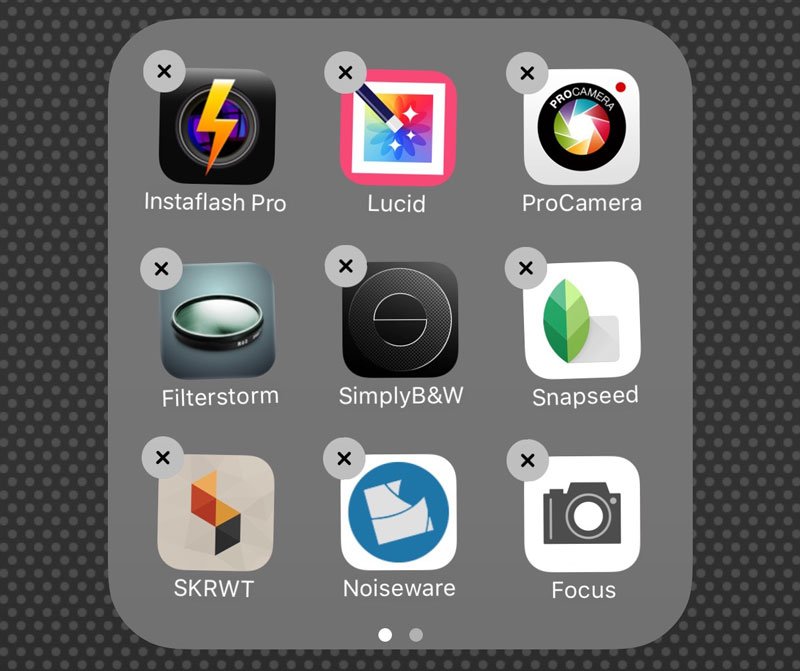
My iPhone Camera Bag updated

This updated Camera Bag post will also go in the navbar above. I wanted to share the evolution of my iPhone. You can read my original Camera Bag post here.

page 4 on my iPhone

Some of my other camera apps. Page 4 on my iPhone

The best camera is the one that’s with you and the one that’s with me nearly all the time is my first generation 8 GB iPhone 2G.

I don’t use one app exclusively to shoot with. I have several and try to match up the image with the app. One of the features that makes the iPhone camera unique is the availability of thousands of photography-related apps. For less than the cost of a DVD, you can basically get a whole new camera experience.

iPhone apps are constantly being created, updated and improved. Since I first wrote my original Camera Bag post, several new apps have been released and several apps have been improved to the point where they have leapfrogged ahead as far as functionality and performance.

I find myself shooting with many different apps than the first time I wrote about my iPhone’s camera bag. Here’s my updated toolbox — the go-to apps I’m currently using.

Read the rest of this entry →

iPhone App Review: SmartCam

UPDATE 12/30/09: In the new 1.31.3 update, images that are processed in-camera are saved in full resolution, 1600×1200 on my 2G.

Also, in the new update, the built-in hook to the image-enhancement website, 9Monkeys.net, now works seamlessly and quickly within the app.

Kudos to the app’s developer Carl Im at 9Monkeys, who has always been very responsive when I’ve brought up issues from the perspective of an end user.

=M=

SmartCam

SmartCam

SmartCam
Version 1.15.3

Bottom Line: A little pricey, but good exposure enhancement for your existing underexposed images

SmartCam from 9Monkeys Ltd. is a camera, exposure enhancement, and portal to an online image adjusting website. It’s an overlooked app that hasn’t really found its audience in the App Store yet. At $2.99 USD, it’s a little more expensive than most apps in this category which typically run about a buck. How does it fare and is it worth the premium? It depends on how you use the app.

Read the rest of this entry →