
HarrisCamera[ToyCamera,multi exposure]
Version 1.0
Price: $0.99

Bottom Line: Low res output, otherwise a cool, little-seen, classic, Pop-style effect.
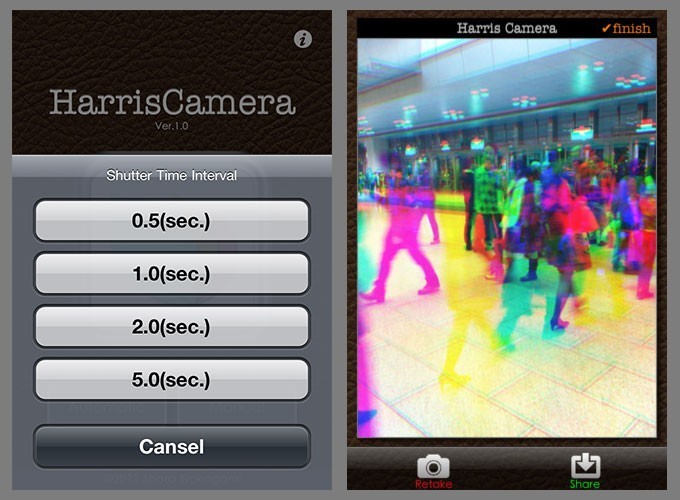
 HarrisCamera for iPhone is a new photo app that creates a “Harris Shutter Effect” (also known as a “Tri-filter Effect”) photo on your iPhone. On film, the effect is produced by re-exposing the same frame of film through red, green and blue filters in turn, usually while keeping the camera steady. You can read more about the Harris Shutter effect here.
This new iPhone app takes multiple exposures and applies different colored filters to the image, creating an interesting and pleasing multicolor effect. It’s an easy to use, straightforward app, but it’s not without its flaws.
The Harris Shutter is a photographic device with red, blue, and green color filters. One method to create the effect calls for photographers to use multiple exposures and different colored filters in front of the lens. The result is an abstract, Pop Art, ghosted effect created in camera.
HarrisCamera the app is super easy to use. There are a few settings. Shoot in Manual mode or choose an interval between the three exposures. Point. Shoot. The app breaks the image down into red, blue, and green components. Where elements align, the image has fairly normal color. Where they don’t align between the three exposures, the image shows interesting, colorful, ghosting effects, similar to those shot with an analog camera and multiple filters. It’s easy to create cool looking photos with HarrisCamera and the best-looking images will have both static and moving elements.
Colors are bright vivid, probably brighter and more vivid than the analog cameras. The resulting effect is looks like a cross between misaligned printing and something very Pop Art — almost like an old television set with a bad color sync.
Unfortunately, the app saves to low resolution, 852×640 pixels – that’s about half a megapixel. A couple years ago, that might have been acceptable for iPhone photography. But especially with the new high-resolution cameras of the iPhone 4 and 4S, a half a megapixel is way too small to show and only good for online sharing to email, Twitter, Facebook, and maybe Flickr
Were it not for the low resolution, I would really like HarrisCamera. I think it’s a unique effect for iPhoneography. The app itself is very easy to use and produces good-looking results. Hopefully we’ll see high resolution supported in a future update.
Requirements: Compatible with iPhone 3GS, iPhone 4, iPhone 4S, iPod touch (4th generation), iPad 2 Wi-Fi and iPad 2 Wi-Fi + 3G. Requires iOS 4.0 or later.
App Store link: HarrisCamera – Shota Nakagami
=M=
~~~~

